📞
BSIS PPO License: 122365
+1 (818) 966-2279
✉️
Sahnaz@workforcesecurityservices.com
Security Camera Placement Guide: Where to Install CCTV Cameras for Maximum Protection
Security cameras are among the most effective tools for protecting commercial properties, employees, customers, and valuable assets. However, installing high-quality cameras alone does not guarantee effective surveillance. The success of a video surveillance system depends largely on proper camera placement.
Poorly positioned cameras can leave blind spots, miss important details, or create a false sense of security. On the other hand, a well-designed camera layout can deter criminal activity, improve incident investigations, support access control, and provide valuable evidence during security incidents.
Whether you operate an office building, retail store, warehouse, healthcare facility, school, hotel, industrial site, or construction project, strategic camera placement is essential for building a comprehensive physical security program.
This guide explains where security cameras should be installed, the factors to consider during planning, common mistakes to avoid, and best practices for maximizing surveillance effectiveness.
Why Camera Placement Matters
A security camera is only effective if it captures the right information at the right time.
Proper placement helps organizations:
- Deter theft and vandalism
- Monitor visitor activity
- Improve employee safety
- Protect high-value assets
- Support incident investigations
- Reduce liability
- Improve situational awareness
- Strengthen access control
- Enhance emergency response
- Support regulatory compliance where applicable
Strategic placement ensures cameras capture meaningful footage rather than simply recording activity.
Start with a Security Risk Assessment
Before selecting camera locations, organizations should perform a physical security assessment.
Evaluate:
- Building layout
- High-risk areas
- Crime history
- Entry and exit points
- Public access areas
- Asset locations
- Employee movement
- Customer traffic
- Parking facilities
- Lighting conditions
The objective is to identify locations where surveillance will provide the greatest security benefit.
Understand Your Surveillance Objectives
Different businesses require different surveillance priorities.
Examples include:
Crime Prevention
Visible cameras discourage opportunistic theft and vandalism.
Access Monitoring
Track who enters and exits restricted areas.
Asset Protection
Monitor equipment, inventory, cash handling, and sensitive materials.
Employee Safety
Improve awareness in isolated workspaces and public areas.
Incident Investigation
Provide recorded evidence following accidents or security events.
Clearly defining surveillance goals improves system design.
Best Locations for Security Cameras
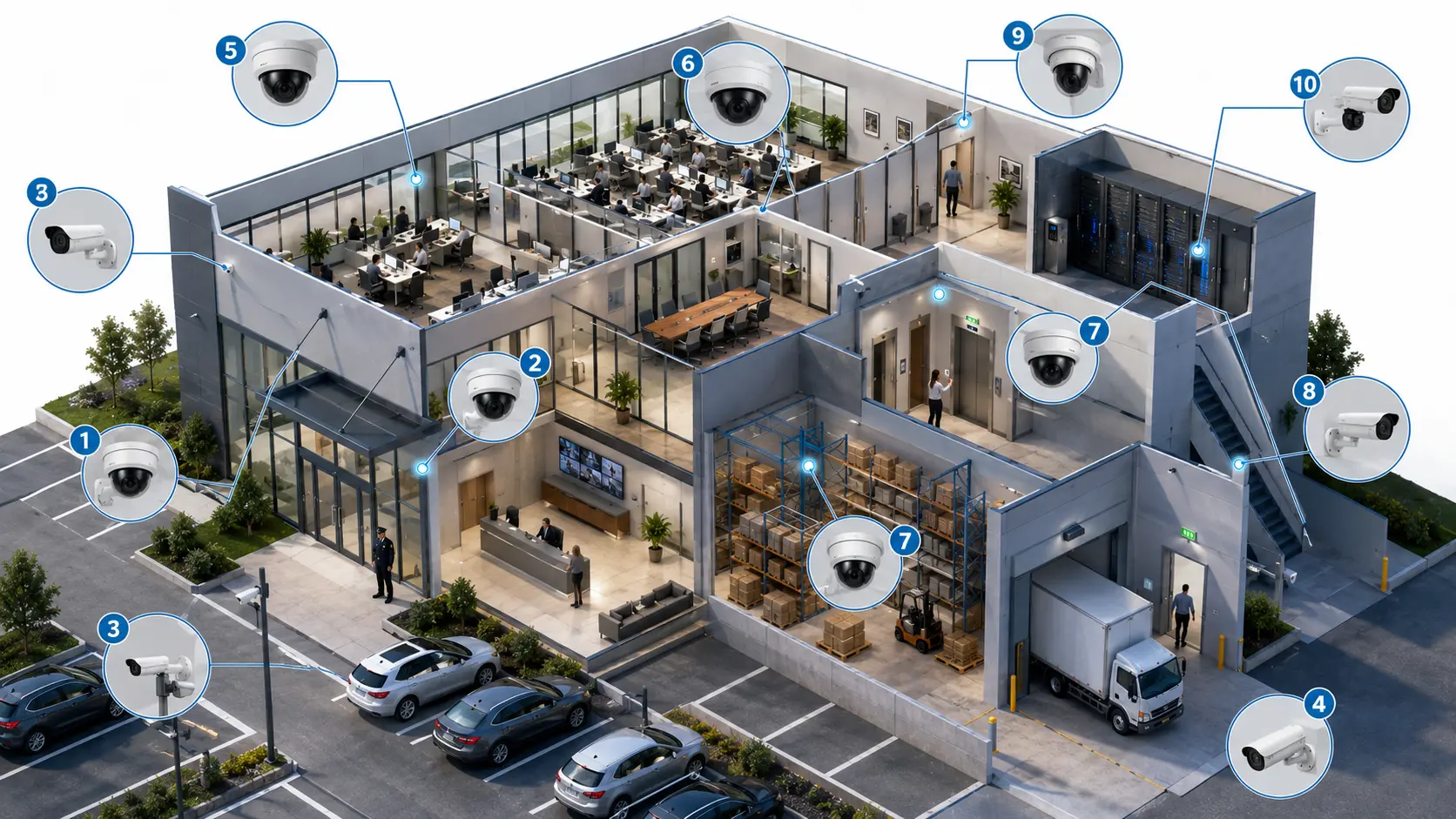
1. Main Entrances
Every primary entrance should be monitored.
Cameras should capture:
- Faces entering
- Faces leaving
- Visitor activity
- Delivery personnel
- Entry doors
- Waiting areas
Avoid placing cameras directly behind bright windows that create glare.
2. Secondary Entrances
Service entrances often receive less supervision.
Monitor:
- Employee entrances
- Vendor entrances
- Loading docks
- Maintenance access
- Emergency exits (where appropriate)
Unauthorized access frequently occurs through secondary doors.
3. Reception Areas
Reception serves as the first point of contact.
Monitor:
- Visitor registration
- Waiting areas
- Reception desk
- Deliveries
- Lobby activity
This footage often becomes valuable during investigations.
4. Parking Lots
Parking facilities experience:
- Vehicle theft
- Vandalism
- Assaults
- Property damage
- Unauthorized gatherings
Coverage should include:
- Entrances
- Exits
- Driving lanes
- Pedestrian paths
- Accessible parking
- Payment stations (if applicable)
Use cameras designed for outdoor conditions and varying lighting.
5. Building Perimeter
Exterior surveillance improves early detection.
Cover:
- Fence lines
- Gates
- Loading areas
- Storage yards
- Utility equipment
- Side entrances
Perimeter cameras provide valuable warning before someone reaches the building.
6. Hallways and Corridors
Hallway cameras help monitor movement throughout the facility.
Ideal for:
- Office buildings
- Schools
- Hospitals
- Hotels
- Warehouses
Long corridors may require multiple overlapping cameras to eliminate blind spots.
7. Loading Docks
Loading docks are common targets for theft.
Monitor:
- Deliveries
- Shipping activity
- Package handling
- Vehicle arrivals
- Employee access
- Inventory transfers
These cameras also assist with logistics investigations.
8. Warehouses and Storage Areas
Inventory protection is a primary objective.
Cover:
- Storage racks
- Shipping zones
- High-value inventory
- Equipment storage
- Forklift routes
Large warehouses may require panoramic cameras or multiple fixed cameras.
9. Cash Handling Areas
Retail stores and financial facilities should monitor:
- Cash registers
- Safes
- Counting rooms
- Customer service counters
- Cash offices
Cameras should clearly capture transactions without obstructing employee operations.
10. Restricted Areas
Sensitive locations should receive enhanced surveillance.
Examples include:
- Server rooms
- IT equipment
- Laboratories
- Pharmaceutical storage
- Records rooms
- Mechanical rooms
- Security control rooms
Access logs combined with video footage improve accountability.
11. Building Exits
Exit cameras help:
- Verify departures
- Track emergency evacuations
- Investigate theft
- Monitor after-hours activity
They should complement entrance cameras for complete movement tracking.
Indoor vs. Outdoor Camera Placement
Indoor cameras generally prioritize:
- Facial recognition
- Customer interactions
- Employee activity
- Hallway coverage
Outdoor cameras should withstand:
- Rain
- Dust
- Heat
- Cold
- Wind
- Low-light conditions
Weather-resistant housings and infrared capability improve reliability.
Determine the Right Camera Height
Camera height affects image quality.
General recommendations:
- Too low increases the risk of tampering.
- Too high may reduce facial detail.
- Typical commercial installations range between 8–12 feet (2.4–3.7 meters), depending on the location and surveillance objective.
High-risk locations may require protective housings or vandal-resistant camera designs.
Eliminate Blind Spots
Every surveillance plan should identify areas not covered by cameras.
Common blind spots include:
- Behind shelving
- Stairwells
- Corners
- Large equipment
- Landscaping
- Parking lot obstacles
- Blind corridors
Walk the property to verify camera views before final installation.
Consider Lighting Conditions
Lighting dramatically affects video quality.
Evaluate:
- Direct sunlight
- Nighttime illumination
- Shadows
- Vehicle headlights
- Reflective surfaces
- Glass glare
- Seasonal lighting changes
Low-light cameras or supplemental lighting may be necessary.
Choose the Right Camera Type
Different camera styles serve different purposes.
| Camera Type | Best Use |
|---|---|
| Dome Cameras | Indoor lobbies, offices, retail |
| Bullet Cameras | Parking lots, perimeters, building exteriors |
| PTZ (Pan-Tilt-Zoom) | Large campuses, stadiums, parking facilities |
| Turret Cameras | General commercial surveillance |
| Fisheye Cameras | Large open interiors |
| Multi-Sensor Cameras | Wide-area coverage with fewer mounting points |
The camera type should match the surveillance objective and environment.
Integrate Cameras with Other Security Systems
Video surveillance works best as part of a layered security program.
Integration may include:
- Access control systems
- Alarm systems
- Visitor management
- Security patrols
- Intercom systems
- Motion detection
- Emergency notification systems
- Incident reporting software
An integrated approach provides better situational awareness and faster incident response.
Legal and Privacy Considerations
Organizations should design surveillance systems in compliance with applicable laws and privacy regulations.
General best practices include:
- Post signage indicating that video surveillance is in use where appropriate.
- Avoid installing cameras in areas where people have a reasonable expectation of privacy, such as restrooms, changing rooms, locker rooms, or private accommodation spaces.
- Limit access to recorded footage to authorized personnel.
- Establish documented retention and deletion policies.
- Secure video recordings against unauthorized access or tampering.
If operating across multiple jurisdictions, review applicable local, state, and federal requirements regarding video surveillance.
Camera Maintenance Best Practices
A surveillance system requires ongoing maintenance.
Routine tasks include:
- Cleaning camera lenses
- Checking image quality
- Verifying recording functionality
- Testing remote viewing
- Updating firmware
- Inspecting mounting hardware
- Confirming storage capacity
- Reviewing camera angles after renovations
Regular inspections help ensure the system remains effective.
Common Security Camera Placement Mistakes
Avoid these common errors:
- Installing cameras without a security assessment
- Leaving blind spots
- Mounting cameras too high
- Ignoring nighttime lighting
- Failing to monitor secondary entrances
- Obstructing views with signs or decorations
- Using the wrong camera type
- Neglecting camera maintenance
- Recording more areas than necessary without a legitimate business purpose
- Failing to secure recorded footage
Correcting these issues significantly improves surveillance performance.
Industry-Specific Camera Placement Tips
Retail Stores
Prioritize entrances, checkout counters, sales floors, stockrooms, and receiving areas.
Office Buildings
Cover reception, elevators, hallways, parking lots, and restricted office suites.
Warehouses
Monitor loading docks, storage aisles, shipping zones, and equipment areas.
Healthcare Facilities
Focus on public entrances, reception, waiting areas, pharmacies, parking facilities, and restricted clinical support areas while respecting patient privacy requirements.
Schools
Cover entrances, administrative offices, hallways, parking lots, athletic facilities, and common areas, consistent with school policies and applicable laws.
Hotels
Monitor lobbies, elevators, parking areas, service entrances, and public corridors while respecting guest privacy.
Construction Sites
Install cameras at entry gates, perimeter fencing, equipment yards, storage containers, and material staging areas.
Frequently Asked Questions
Where should security cameras never be installed?
Security cameras should not be installed in places where individuals have a reasonable expectation of privacy, including restrooms, locker rooms, changing rooms, private accommodation spaces, or similar areas.
How many security cameras does a business need?
The number depends on the property’s size, layout, risk level, number of entrances, and surveillance objectives. A security assessment is the best way to determine appropriate coverage.
Are visible security cameras better than hidden cameras?
Visible cameras are generally more effective for deterrence. In some circumstances, organizations may also use discreet cameras where permitted by law and justified by a legitimate business need.
Should parking lots have security cameras?
Yes. Parking areas are common locations for theft, vandalism, and vehicle-related incidents, making them a high priority for surveillance.
How often should security camera systems be inspected?
Many organizations perform basic operational checks regularly and more comprehensive inspections on a scheduled basis, such as monthly or quarterly, depending on the environment and criticality of the system.
Conclusion
An effective security camera system is built on thoughtful planning—not simply the number of cameras installed. By conducting a security risk assessment, identifying high-priority areas, selecting the right camera types, eliminating blind spots, accounting for lighting conditions, and integrating surveillance with broader physical security measures, businesses can significantly improve the protection of people, property, and operations.
When combined with professional security personnel, access control, visitor management, and routine maintenance, strategically placed security cameras become a powerful component of a comprehensive security program.